

Questions & answers
Getting started
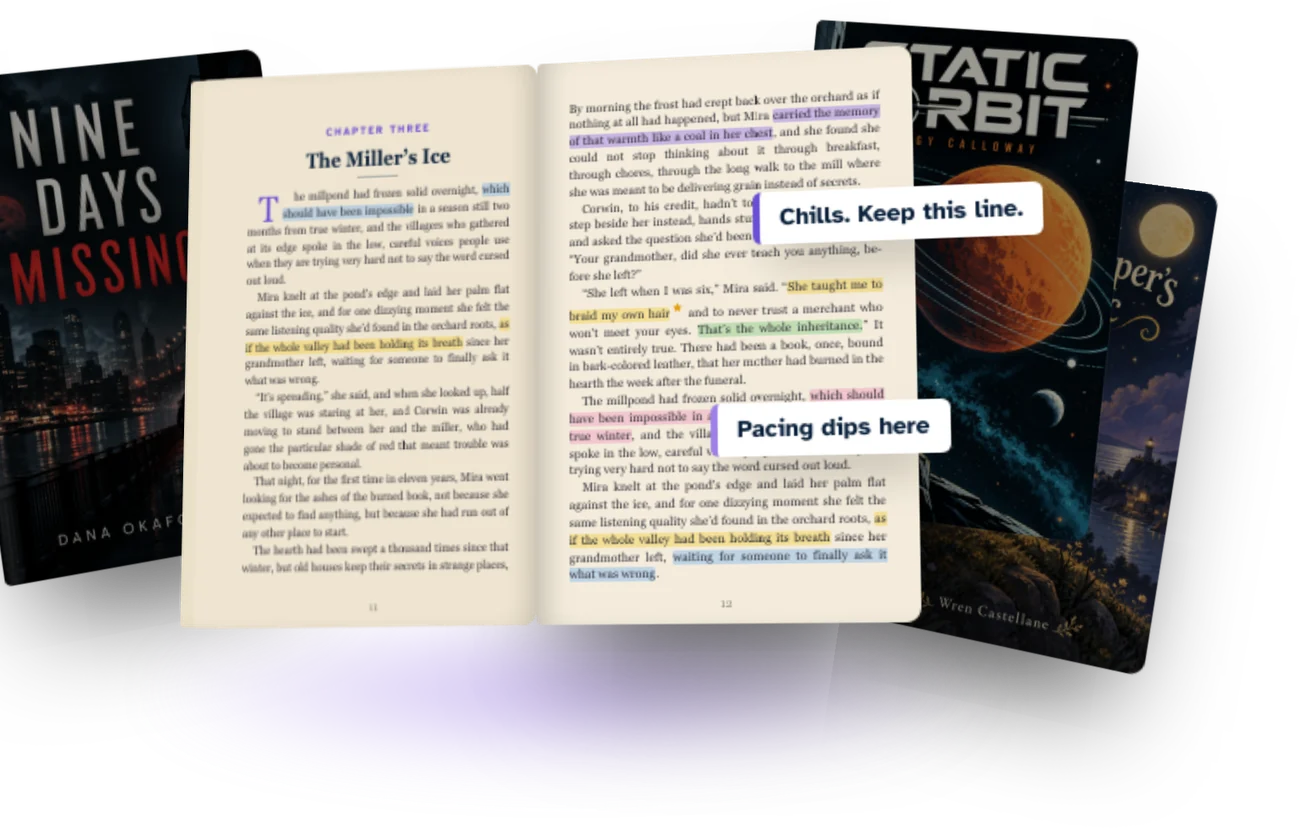
A private place to share a manuscript with beta readers and collect what they think of it. Authors and publishers import a manuscript and invite the readers they choose; readers read it in the browser and leave highlights, notes, chapter ratings and survey answers.
Nothing is public, and the manuscript is never handed over as a file.
Authors preparing a draft, publishers and editorial teams running beta rounds across several titles, and the beta readers they invite. Reading is always free.
Four steps:
- Import your manuscript. Chapters are detected for you.
- Check the structure, then publish it. Nothing is shared until you do.
- Invite the readers you choose, with a deadline if you want one.
- Read the feedback as it arrives, reply to it, and export what you need.
No. Manuscripts are private to the people you invite, and nothing you upload is browsable, searchable or visible to the outside world.
There is a Reading Room inside the app, visible only to signed-in members, where authors can post a reading opportunity and readers who have chosen to make their profile public can be found. Both sides are opt in, and a public reader profile never shows reading activity or notes.
BetaReadIt is not a reader agency and does not sell or assign readers. You invite the readers you already know by email.
If you need more, you can post a reading opportunity in the Reading Room, where signed-in readers can apply and you decide who gets in.
No. Every note, rating and survey answer comes from a real person who read the book. BetaReadIt does not generate readers, does not write feedback for them, and does not produce an automated critique of your manuscript.
What the software does is practical: it finds your chapters on import, keeps every note anchored to its passage, and gathers the results in one place.
Yes, but it takes a moment and it is free. When an author invites you, the email brings you straight in; you can sign in afterwards with a personal link sent to your address, or set a password if you prefer one.
The account is what keeps your notes, your place in the book and your reading history together across devices.
An author or publisher invites a reader by email. Someone new gets an email that takes them to the manuscript; someone who already has a BetaReadIt account gets an invitation to accept or decline, and nothing about them is shared with the author until they accept.
An invitation stays open until the reader answers it, and access can be revoked at any moment once granted.
Authors & publishers
From Manuscript, choose Import and upload your file. The chapters are detected automatically, you check them in Structure review, and then you publish. Only after publishing can anyone be invited to read.
Text manuscripts as .docx, .epub, .odt, .pdf, .rtf, .txt, .md or .html.
Illustrated books and comics are uploaded as images, a folder or a ZIP file, where each subfolder becomes a chapter. Older .doc files and Kindle formats are not readable: export to .docx or EPUB first.
BetaReadIt reads the structure of your document and splits it into chapters on import. If a break lands in the wrong place, Structure review lets you rename, merge and split chapters before you publish, and you can edit the structure again afterwards.
Yes. Nothing is shared until you publish, and you can read your own manuscript in the same reader your beta readers get, so you see exactly what they will see.
Yes. How many you can keep active at once depends on your plan: 1 on Free and Author, 5 on Pro, 25 on Publisher. Archiving a manuscript you have finished with frees the slot without deleting anything.
From the manuscript, search the readers you already have or type a new reader’s email address; you can add several in one go. People, then Readers, then Pending shows everyone who has not answered yet, and lets you resend or cancel.
Yes. Each reader’s profile shows real progress, reading time and pace, chapter by chapter, for your manuscripts. Unusually fast reading is flagged, so a returned survey never makes a skimmed book look finished.
Yes. Attach a survey to the manuscript and readers find it on the manuscript page and at the end of the book. You can mark questions as required. Readers also rate chapters as they go, without being asked.
Yes. Reply to any note in a thread, and mark it resolved when it is dealt with. You can also message a reader directly, in the context of the book they are reading.
Yes. Export the annotated manuscript as a .docx with real Word comments in the margin, each carrying the reader’s name, so a revision pass happens in Word exactly as you are used to.
Word export is included from the Author plan up.
Yes, on the plans that include more than one seat: 3 team members on Pro, 10 on Publisher. Invite them from People, then Team, and add each one to the manuscripts they should work on.
Upload the revised document as a new version of the same manuscript. Earlier versions stay in the history, you can compare two versions chapter by chapter on Pro and Publisher, and readers’ marks follow the passages they belong to. Nothing from an earlier round is lost.
How many rounds you can run depends on the plan: 1 on Free, 3 on Author, unlimited on Pro and Publisher.
It moves to the Archived section and leaves your dashboard. Nothing is deleted: the readers’ feedback stays, and it stops counting towards your plan’s limit. You can reactivate it at any time.
Beta readers
An author or publisher invites you by email. Open the link, accept the invitation and the manuscript appears in My Readings. If you have a public reader profile, you can also apply to a reading opportunity in the Reading Room and wait for the author to accept.
No. Everything happens in your browser, on any device. There is no file to download, and no app you are required to install.
Yes, with the same account. Your place in the book, your bookmarks and your notes follow you, so you can stop on the bus and carry on at your desk.
Yes. The book reopens where you left it, on whichever device you pick up next.
Yes. Light, sepia or dark, the font, the text size, the margins and the line spacing, plus scrolling or paginated mode. Set it once and every manuscript opens that way.
Select a passage while reading. You can highlight it, add a note, mark it as a favourite, or report a problem such as a typo or something that does not add up. Bookmarks keep the places you want to come back to.
No. Your notes go to the author or publisher and the team members working on that manuscript, and to nobody else. Other readers never see your notes, your ratings or what you marked.
Yes. Your answers are saved with the manuscript and you can send an updated version while the round is open. Some questions may be marked as required by the author.
Yes. Each manuscript has a conversation with the people behind it, so a question about chapter twelve stays next to the book it belongs to. You can also ask for more time: an approved extension counts as finishing on time.
Yes. Open the manuscript and choose to leave it. Leaving shortly after you are assigned does not affect your reliability, and the page tells you the exact date before you confirm.
A trust signal on your profile, never a rating of your taste. Everyone starts as a New Reader; finishing on time, with the survey answered and reading activity BetaReadIt can verify, earns points that move you up through Rising, Reliable, Trusted and Proven Reader to Beta Champion.
Leaving a project early is never a penalty.
Feedback
Four kinds, all anchored to the passage they belong to:
- a highlight, with or without a note
- a favourite, for the lines that landed
- a report, for a typo, a continuity slip or something unclear
- a chapter rating, plus the author’s survey at the end
Tags say what a note is about: Liked it, Unclear, Error or typo, Pacing, Character, Worldbuilding, Dialogue, Other. Severity says how much a report matters: Minor, Major or Blocker, and a reader can leave it unsaid.
Together they turn a long list of comments into something you can sort and act on.
Readers rate each chapter as they finish it, while the impression is still fresh, and answer the survey you wrote at the end of the book. The ratings show where a story holds and where it dips; the survey gives you the reader’s take in their own words.
All the feedback for a manuscript lands in one panel. Filter it by reader, by type, by severity or by whether it is still open, and read the chapter ratings as a single line across the book. Five readers stumbling in the same chapter stops being five separate emails.
Yes. Feedback can be filtered by reader, type, severity and status, and you can work chapter by chapter, or jump from a note straight to the passage it refers to.
Resolving a note marks it as dealt with and takes it out of the open list, without deleting it. The reader keeps their note, you keep the record, and the thread stays readable.
The same way, in a reader built for pages and panels. Readers annotate a page directly, and a page with several marks on it can be viewed as a heatmap, so you see at a glance which pages got the most reaction.
Privacy & security
No. The manuscript is read in the browser and is never delivered as a file a reader can save, forward or keep after you revoke their access.
There is no download and no print button, and every page carries a watermark tied to the reader looking at it. Nothing stops someone photographing a screen, which is why access is also traceable and revocable.
Only the readers you invite and the team members you add to that manuscript can open it. Access is per manuscript, so a reader on one title sees nothing of the others, and each organisation’s data is kept separate from every other.
Yes, instantly. Revoking sessions signs them out of every device; disabling them takes away access to all of your manuscripts until you enable them again. Their account and everything they wrote stay as they are.
Sign-in links expire within minutes, and an invitation to join a team carries an expiry date. An invitation to read a manuscript stays open until the reader accepts or declines it.
The control that matters is access: you can revoke a reader at any moment, and their reading room closes with them.
Yes. Every page carries a dynamic watermark with the reader’s own identifier and the time they are reading, so a photographed page still points back to the account it came from.
Yes, always. Before opening any manuscript, every reader accepts BetaReadIt’s confidentiality agreement. It is one agreement per reader account, covering every manuscript they are invited to, recorded with the date and the version accepted. Authors can’t swap in an agreement of their own.
No. Readers do not see who else was invited, what other readers wrote, or how far anyone else has read. Each reader only sees their own reading.
No, and nobody can honestly promise that. A determined person can photograph a screen or retype a page.
What BetaReadIt does is make that the only route, and make it accountable: no file to forward, a watermark on every page, an NDA recorded per reader, access you can revoke in a click, and a log of meaningful activity.
Nothing, unless you turn on a public reader profile. Even then it shows only what you filled in and your reliability level, never your reading activity, your notes or which manuscripts you have read.
Yes. Settings, then Your data, gives you one file with your profile, reading, notes, survey answers and the messages you sent. Deleting your account is in the same place: it is scheduled, and you have 30 days to change your mind.
Accounts & teams
An author or publisher profile belongs to an organisation: it imports manuscripts, invites readers and holds the plan. A beta reader profile is what authors see when they consider inviting you, and it is free.
Yes. The same account can read for other authors and run beta rounds on its own manuscripts. Nothing has to be rebuilt the day a beta reader becomes an author.
- Owner: full control of the organisation, including billing.
- Admin: manages manuscripts, people and settings.
- Manager: runs the rounds on the manuscripts they are added to.
- Contributor: works on a manuscript without changing its setup.
- Viewer: reads the feedback and changes nothing.
Yes. Owners and admins work across the organisation; everyone else only reaches the manuscripts they have been added to, with the role they were given on each one.
The team members working on that manuscript. Muting a conversation is personal to you and does not affect the rest of the team.
Yes. Blocking stops messages, requests and invitations in both directions, and removes you from each other’s view in the Reading Room. Manuscripts already shared stay as they are, and you can unblock from Settings.
Pricing & billing
Yes, always, on every plan. Reading, taking notes and answering surveys never costs a reader anything.
Yes. Free gives you 1 manuscript, 5 readers, 1 team member and 1 round, which is enough to run a real first beta read. No card is needed to start.
Each plan adds room, and a few tools along the way:
- Free: 1 manuscript, 5 readers, 1 team member, 1 round.
- Author, $9 a month: 1 manuscript, 25 readers, 1 team member, 3 rounds, plus Word export and surveys after any chapter.
- Pro, $15 a month: 5 manuscripts, 100 readers, 3 team members, unlimited rounds, everything in Author, plus version comparison and reader groups.
- Publisher, $49 a month: 25 manuscripts, 250 readers, 10 team members, unlimited rounds and everything in Pro.
Annual billing costs ten months instead of twelve.
Any manuscript that has not been archived. Archiving one you have finished with frees the slot and deletes nothing, so a plan’s limit is about what you are working on now, not what you have ever done.
Nothing already published stops working. You are told which limit you have reached, and you can archive a manuscript you are done with, or move to a bigger plan.
Yes, at any time. The organisation’s owner changes or cancels the plan from Billing, and annual billing can be chosen from the same place.
Yes. If you need more titles, more readers or more of your team than Publisher allows, get in touch and we will shape a plan around what you actually publish.
No answers found for that search.
Try another word, or ask us directly and we will point you in the right direction. Get in touch →Still have a question?
Still wondering something?
If it is not answered here, write to us. A real person reads it and replies.
Give your next manuscript the reading round it deserves.
Start with one manuscript and five readers, free. Beta readers always read for free.